The ability to track a team can provide valuable information both during and after a mission. Having a situational awareness of where the squad’s teams are can have a major impact on response time and efficiency.
Start Track
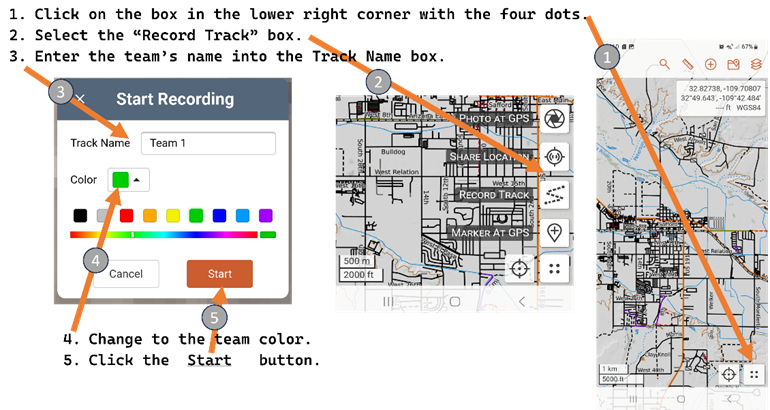
Once a team has received an assignment one of the team members should start a track on SAR Topo as they leave the CP or staging area. To start a track:
Once the team track starts move it into the team’s folder (see above).
End Track
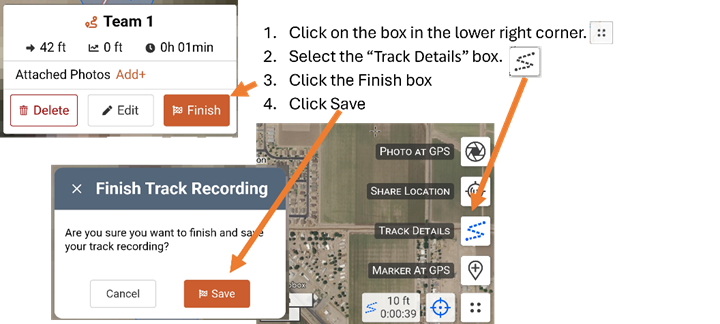
When done the track will need to be saved:
Tracks are a way to inform the CP of your whereabouts and actions. Save and start tracks when your situation changes such as returning to the CP when task is done or when a footprint is located and you are now tracking a potential subject (so… you have a Track on SAR Topo showing you are tracking the subject).
Editing Track
Once the team track is created move it into the team’s folder (see above).
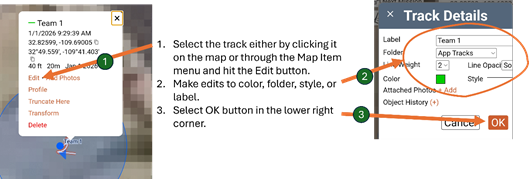
It may be advantages to change a track’s appearance to indicate the team’s activity. To do this:
Label
The label should be the team’s name with additional useful information. For example:
• Team 1 returning to CP
• Team 2 searching creek bed
• Team 4 Cutting sign.
Folder
The folder should be the team folder unless told otherwise.
Color
The color should be the team’s color.
Style
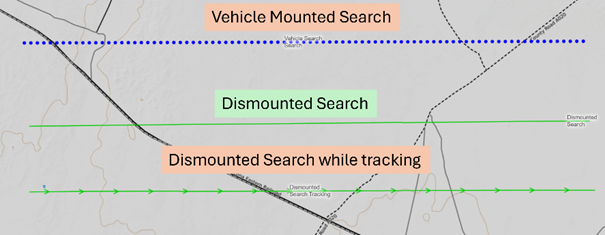
The line style should reflect the team’s current task. Here are some standard line styles: