Markers serve as the fundamental building blocks for spatial communication within SAR Topo. By visually representing key data points, markers enable teams to quickly understand the lay of the land, track progress, and share essential details across field and command units.
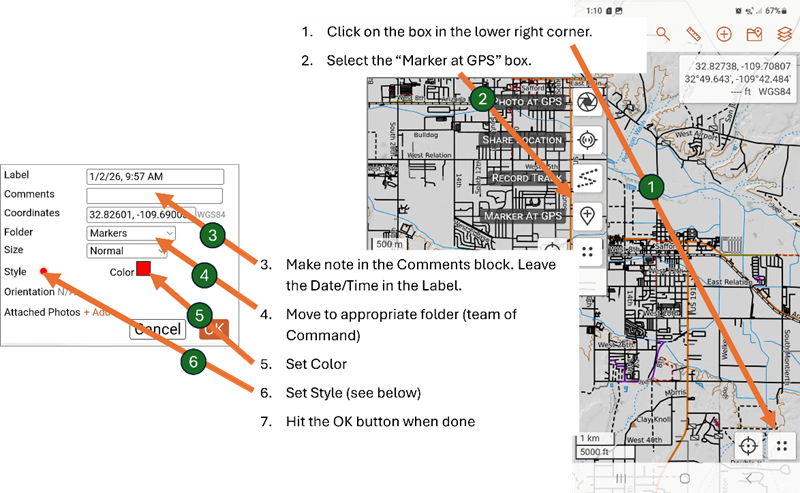
When out in the field it will be necessary to post on SAR Topo the location of clues and other information. There are two ways to add a marker to the SAR Topo map: using Marker at GPS and using the Add Map Item menu.
Marker at GPS
This is the preferred method when out in the field. This will drop the marker at your current GPS position.
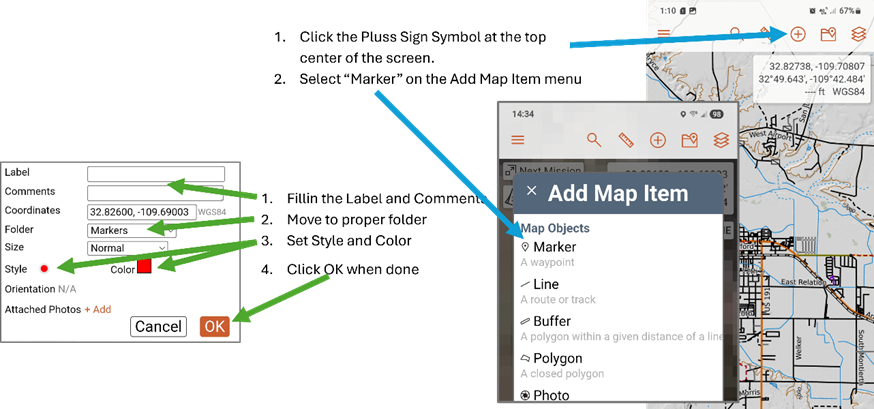
Add Map Item
This method is used mainly by the command post staff to place critical information such as Last Known Point. Care must be taken when using this method because it drops the marker at the center of the screen and must be moved to its proper position.
Standard Markers
A standard set of markers is defined to help quickly place meaningful markers on the map. This list is evolving and probably will change.
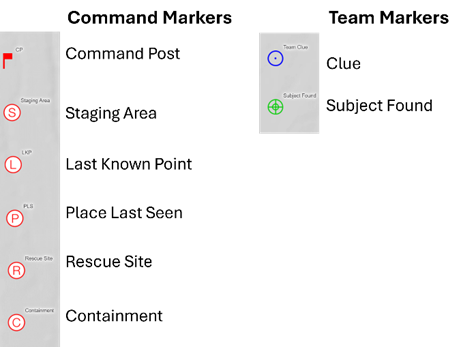
Command Markers are used by the Command Post staff to display information common to the mission while Team Markers are used by individual teams for their specific needs.