Folders are an organizing tool in SAR Topo. They help to declutter the map and offer a way to group data to make it more accessible. Unless you select a different folder at the time of creation all objects added to the map will initially appear in one of two folders: Markers, or Lines and Polygons.
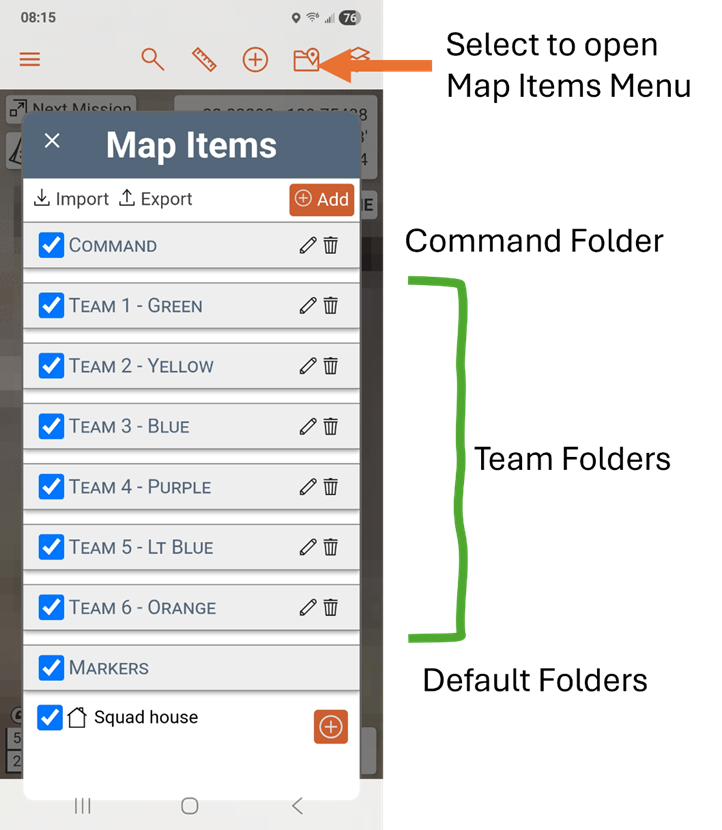
Graham County Search and Rescue Next Mission map has predefined Team folders. Each team has a predefined folder available to store the team’s objects (markers and tracks). To view the Team folder on your phone, click on the File symbol in the upper right of the application. This will show you the Map Item menu.
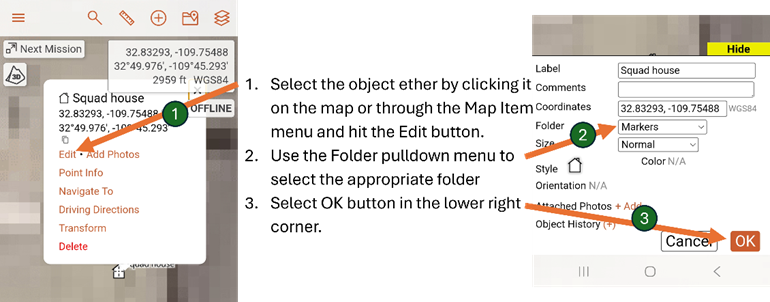
Some objects are placed automatically into the generic Marker or Lines folders and should be moved to the proper team folder.
Move an object: